
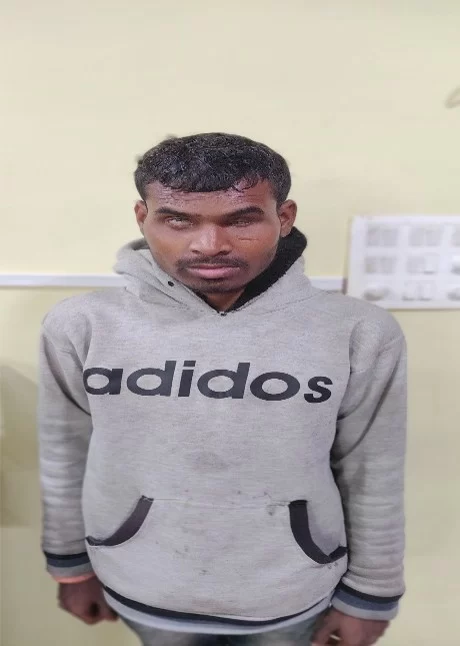
1. Personal Profile
* Name : Hem Lal Paikra
* Father's Name : Sujan Singh Paikra
* Mother's Name : Sharda Bai Paikra
* Family Background : 1 Brother (Married), 3 Sisters (Married)
* Age : 23 Years
* Date of Birth : 15/07/2003
* Educational Qualification : 8th Standard
* Additional Educational Skills : Basic knowledge of Braille
* Occupation : Daily-wage Laborer & Agriculture
* Hobbies : Listening to music
* Address : Kasdol, District Balodabazar, Chhattisgarh - 493335
2. Background & Pre-Training Context
Hem Lal Paikra resides in village Chichpol with his parents. Being the youngest among his siblings, his elder brother lives separately due to migration for work. His parents are marginal farmers who depend on agriculture for their livelihood.
Hem Lal experienced gradual visual impairment starting around 6th grade. Earlier, he had partial vision, but over time he became completely visually impaired (100% blind). He completed his primary education in Chichpol, during which a local Braille teacher from Sel village taught him Braille weekly. He completed his middle school education in Charoda. Although he approached a Braille school in Mahasamund, he could not continue his education beyond the 8th grade due to the loss of his official marksheets.
3. Mobilization & Identification
Under the Social Inclusion Project, jointly implemented by KALP NGO, Balodabazar and Sightsavers, the Tanya Computer Training Center was operationalized in the Balodabazar district. During field mobilization, field workers from KALP identified Hem Lal, counseled him, and motivated him to enroll in computer education. Consequently, he started his training in November 2023.
4. Computer Training & Skill Acquisition
Before joining Tanya Computer Center, Hem Lal had only heard about computers in the context of Aadhaar-enabled cash withdrawals, but he had never touched or operated one. Through structured and accessible computer training, he successfully acquired the following technical skills:
* Computer Fundamentals: Understanding computer definitions, components, input/output devices, software vs. hardware, and basic system navigation (powering on/off, desktop layout).
* File & Folder Management: Creating, deleting, copying, cutting, saving, and organizing files and folders.
* Keyboard Navigation: Mastered key identification including Function keys, Alphabet keys, Special keys, Arrow keys, and the Numpad.
* Word Processing (Microsoft Word) : Formatting text (Bold/Unbold, Underline), font adjustments (size and family), text alignments (Left, Right, Center, and Justified).
* Assistive Technology (NVDA Screen Reader): Opening/closing NVDA, identifying active software titles, reading lines or full documents, and navigating system date and time.
5. Impact & Future Outlook
Through the Social Inclusion Program, Hem Lal transformed from having zero digital exposure to confidently operating computers independently using screen readers. This training has built his self-confidence, breaking the barriers imposed by his visual disability and paving the way toward greater independence and social empowerment.